WHITEPAPER
How to create an effective online onboarding plan

Author
The #1 AI-powered authoring tool on the market

Factory
Custom e-learning content factory

Skills
Comprehensive power skills course catalog

LMS
All-in-one LMS platform with AI

Engage
App for managing frontline teams

Game
Gamification app for business
FEATURES

AINew
Unlock your full potential and speed up course creation with artificial intelligence.

Accessibility
Automatically meet accessibility guidelines—without sacrificing interactivity!

Interactivity
Boost engagement with interactive, ready-to-use activities that make learning fun.

Course Creation
Reduce the time it takes to create your e-learning courses with our authoring tool.

Distribution
We offer you different distribution options, so that nothing can stop you.

SCORM
Publish your course in SCORM format and share it on any LMS.
SERVICES

Instrucional Design
Surprise your students with multimedia and interactive content.

Custom Courses
We create e-learning courses for you—tailored to your needs and hassle-free!

Virtual Reality
Turn learning into an immersive experience.

Custom Avatars
Give your courses and videos a unique touch with personalized avatars.

Audiovisual FactoryNew
Turn training into something dynamic and visual with engaging videos.
CATALOG
Course catalog
Over 600 skills and competency courses to help you adapt to your team's needs.

Microsoft Copilot AcademyNew
Your professionals will learn how to apply Copilot AI to key processes within your organization.
Artificial Intelligence Academy
Train your teams in the practical use of AI to boost productivity and innovation in your company.

Cybersecurity Academy
Capacita a tu empresa con el catálogo más completo en seguridad digital corporativa.
FEATURES

Quizzes & Games
Turn your training into an engaging Q&A game.

Challenges & Competitions
Enhance learning through friendly peer challenges.
Rewards & Incentives
Motivate employees with points, levels, and leaderboards.
Social & Collaborative
Strengthen team connections with interactive social dynamics.

KPIs & Analytics
Track and optimize your training initiatives instantly and effortlessly.

Use cases
Choose the solution that best fits your needs

Industries
Solutions for all types of industries
USE CASES
Onboarding
Facilitate the onboarding process, productivity and engagement of your new employees.
Upskilling
Boost your team's skills and prepare them for the challenges of the future with upskilling.
Microlearning
Discover all the advantages of microlearning and boost your training results.
Gamification
Enjoy addictive training that will get your professionals hooked.

Internal Communication
Improve communication in your company and enjoy an aligned and committed team.

Mobile learning
Agile, flexible, and interactive learning—built for today’s digital-first workforce.
INDUSTRIES

Banking and financial services
Training in compliance, cybersecurity, customer service, and key skills development.

Pharmaceuticals and healthcare
Digital onboarding, regulatory updates, and ongoing training for healthcare staff.

Retail and consumer
Agile and scalable training for in-store, operational, and customer service teams.

Industry and manufacturing
Training in processes, safety, and corporate culture for distributed teams.

Education and training
Digital solutions for training centers, internal academies, and corporate universities.

Technology and telecommunications
Development of technical talent, digital skills, and upskilling and reskilling programs.
CLIENTS

MAPFRE
How MAPFRE turn e-learning into sales with isEazy

Pepco
A personalised learning experience for a growing team.

BBVA
Digitisation and creation of high quality e-learning content.

Shiseido
We increase the engagement of the training with a social and gamified app.

Telefónica
Large-scale reskilling for the company's digital transformation.

Vodafone
A personalised learning experience for a growing team.
More than 1,000 companies already rely on isEazy.





MEET ISEAZY

News
Find out the latest news about isEazy: press releases, partnerships, updates...

Contact
Leave us your personal details and we will contact you as soon as possible.
About isEazyNew
Find out more about our company.
Careers
We are looking for the best talent, join our team!

Partners
Become our partner and grow your business.
INTERESTING RESOURCES

Blog
The best content on e-learning: trends, tools and key strategies.
Whitepapers
Gain valuable insights and stay ahead of industry trends.
Product releases
The latest news and releases of our e-learning products and solutions.

Glossary
Definitions of the most commonly used terms and key industry concepts.
Guides
Discover the best step-by-step tips and tricks to optimize your L&D strategy.
Webinars
Video sessions on our products, trends and more

Comparatives
Compare e-learning solutions available on the market and choose the most suitable one.

April 9, 2026

CONTENT CREATED BY:
Table of contents
Many companies already have a structured onboarding plan in place, but that plan does not always translate into real training. Without courses, modules, or assessments, the integration of new employees depends on each manager’s own criteria and becomes impossible to scale. According to onboarding statistics, companies with structured onboarding processes improve talent retention by up to 82% (source: G2). The difference between having a process and having a training system is exactly what this article addresses.
An onboarding course is the training version of the integration process. Where the onboarding plan defines phases, responsibilities and timelines, the onboarding course turns that content into learning modules with clear objectives, structured materials, and assessments that make it possible to measure whether the new employee has internalised what they need to know to start performing in their role.
We are not talking about a PDF sent by email on the first day, nor a folder shared on Drive. An onboarding course is a structured training programme — it may be e-learning, blended or face-to-face — specifically designed so that the new employee learns, not just receives information.
The key distinction: information can be forgotten; structured learning is retained and can be measured.
The content of the onboarding course should not simply replicate the integration plan as-is, but reorganise it into coherent training blocks. These are the five modules that must not be missing:
Module 1 — Company culture, values and mission. It explains who they are, what they stand for, and how decisions are made. This is the foundation for the employee to understand the context before receiving any other information.
Module 2 — Processes and workflows. It describes how the department operates: meetings, methodologies, cadences and operational protocols. It avoids verbal overload on the first day and allows the employee to consult it whenever needed.
Module 3 — Tools and systems. Tutorials and guides on the technology stack they will use: CRM, communication tools, internal platforms, access credentials. The more interactive, the less friction during the first real days of work.
Module 4 — Role-specific content. What is specifically expected of this person in this position: KPIs, responsibilities, typical cases and decisions they will face. Without this module, the employee may know the company but not know how to do their job.
Module 5 — Follow-up assessments. Knowledge tests at the end of each module, practical scenarios or situational simulations to verify that the learning has been genuinely assimilated. This is the component that turns the course into a measurable process.
Two concepts that are often confused but serve complementary purposes. Here is the key distinction:
| Onboarding plan | Onboarding course |
|---|---|
| Operational process | Structured training content |
| Defines phases and tasks | Defines modules and learning objectives |
| Focus on integration into the company | Focus on learning the role and tools |
| Manages timelines and responsibilities | Manages knowledge and assessment |
| Linear and chronological experience | Scalable and reusable training |
The plan answers the question “what needs to be done and when?”. The course answers “what does the new employee need to know and be able to do?”. In practice, the plan is the umbrella and the course is one of the most important resources that executes it. If you want to go deeper into the strategic side, check out our guide on onboarding plans for companies.
The good news is that you do not need to start from scratch. If you already have an onboarding plan, you have the raw material. The work consists of transforming it into structured training. These are the seven steps to do it:
The structure of the course varies significantly depending on the type of company and the profile of the new employee. These three scenarios illustrate how it works in practice:
Retail: operational onboarding at the point of sale
The new sales assistant needs to learn before their first shift: till procedures, customer service standards, returns protocols and security. The course is organised into short modules (microlearning), accessible from mobile, completable within the first three days. Each module ends with a quick test. The interactive format reduces the dependency on the supervisor to explain the basics.
Corporate: culture and tools in service companies
The new analyst or technician needs broader context: company history, organisational chart, team working methodology, technology stack and style guides. The course includes welcome videos from senior leaders, interactive tool modules and simulated workflows. It runs over two to three weeks alongside real on-the-job activity.
Industrial: compliance and safety
Before accessing the plant or operating any equipment, the new worker must complete mandatory modules: risk prevention, PPE protocols, emergency procedures and specific machine operation. The course is 100% mandatory, generates an individual compliance certificate, and is updated every time regulations change.
Sellics is an example of how a well-designed onboarding course can transform the speed of integration for a growing team. With isEazy, they structured their welcome process into modular, scalable training. Discover how they did it →
Choosing the right tools makes the difference between a course that is easy to update and one that becomes obsolete within a month of publication. There are three main categories:
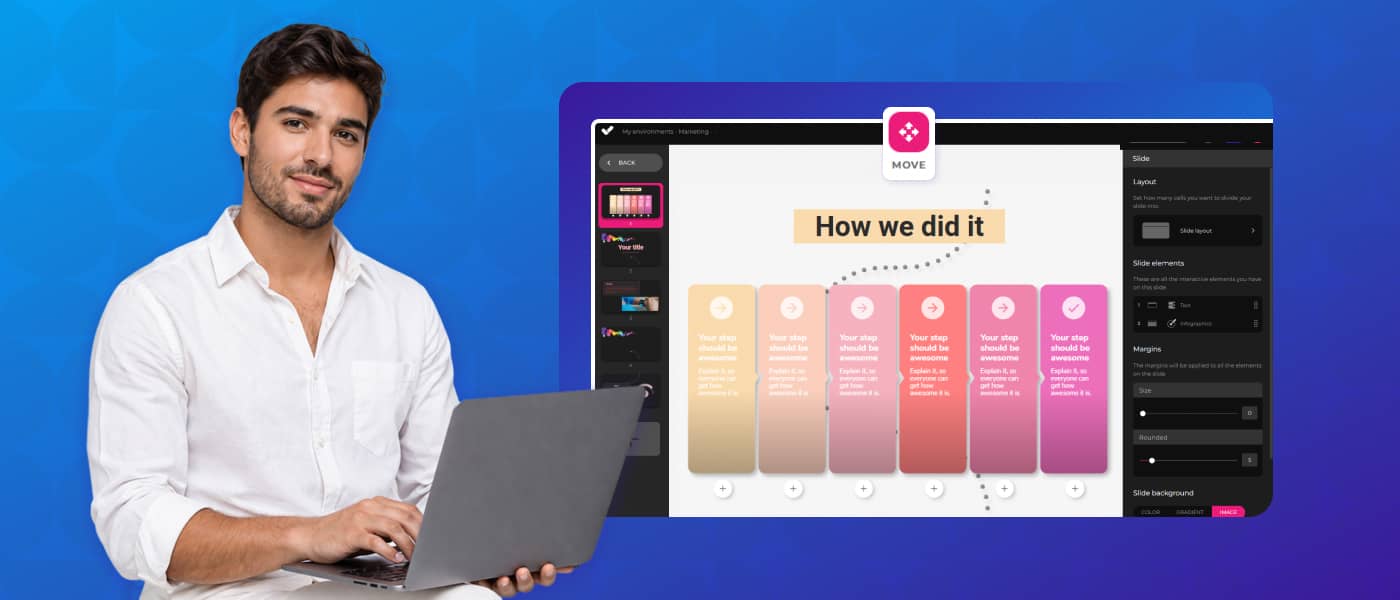
These are the platforms that allow you to create the training content of the course: modules, interactives, assessments, videos and simulations. A powerful authoring tool removes the dependency on a technical team and allows L&D managers themselves to create and update courses in record time.
isEazy Author is the authoring tool designed for L&D teams that need to produce quality courses without technical friction. Among its features for onboarding courses:
Want to see how isEazy Author compares to other authoring tools on the market?

Features
Advantages
Pricing
Features
Advantages
Pricing

Features
Advantages
Pricing
Features
Advantages
Pricing
The LMS manages the distribution of the course: it assigns modules based on the employee’s profile, tracks progress, sends automatic reminders and generates completion reports. Without an LMS, onboarding courses are neither scalable nor measurable at a corporate level.
Looking for the most suitable LMS for your organisation? Compare the available options:
Features
Advantages
Pricing
Features
Advantages
Pricing

Features
Benefits
Features
Benefits
All-in-one platforms integrate the authoring tool and the LMS in a single environment, eliminating integration issues and simplifying the L&D team’s workflow. They are especially useful when the L&D team is small and needs to manage the entire cycle: create, distribute, measure and update.
The course design is just the first step. These complementary strategies make the difference between an onboarding that works in the first month and one that builds long-term performance:
Segment by profile from the start. Avoid a single universal course. Create differentiated paths by department, role or seniority level. The new sales manager does not need the same content as a junior developer. The more relevant the content, the higher the completion rate.
Include social learning moments. Learning alone in front of a screen has its limitations. Include group activities, mentoring sessions or peer forums in the course design. The social component reinforces knowledge retention and accelerates team integration.
Design for mobile from day one. Many new employees — especially in retail, logistics or field roles — will complete the course from their phone. A course that is not designed for mobile has structural barriers from the outset. Explore what online onboarding looks like in practice.
Automate without losing the human element. An LMS can automate assignment, reminders and progress reporting. Use that automation to free up manager time and dedicate it to the moments that genuinely require human interaction: first-day welcome, initial feedback, role clarification. Learn more about onboarding automation.
Measure time-to-productivity, not just completion. Completion is a necessary metric but not sufficient. The real objective of an onboarding course is to reduce the time it takes for a new employee to reach their full performance level. Track that indicator and adjust the course content accordingly.
Knowing the most frequent mistakes saves redesign time and prevents the effort invested in creating the course from failing to deliver real results:
Before rolling out your onboarding course to new employees, run through this checklist:
| Element | Verified? | Validation criterion |
|---|---|---|
| Learning objectives defined per module | ☐ | Each module answers "on completion, the employee will be able to…" |
| Modules structured by topic | ☐ | Culture / Processes / Tools / Role / Assessment |
| Formats defined by content type | ☐ | Video, interactive, text, scenario or game depending on the module |
| Content created and reviewed | ☐ | Reviewed by HR and the employee's direct line manager |
| Distribution tool selected | ☐ | LMS or all-in-one platform configured and tested |
| Measurement system activated | ☐ | Assessments, completion metrics and reports configured |
An onboarding plan defines what needs to happen. An onboarding course makes it happen in a structured, measurable and scalable way. The companies that manage to make this transition stop depending on the individual initiative of each manager and start building a consistent new-hire experience that directly impacts retention and time-to-productivity.
If you already have a plan, the raw material is there. The next step is to turn it into a training system that works even when nobody is looking. isEazy Author gives your L&D team everything they need to create, distribute and update onboarding courses autonomously — without technical dependency.
An employee onboarding course is a module-based training program designed to integrate new employees effectively. Unlike an onboarding plan — which defines the process and phases of integration — an onboarding course turns that content into concrete learning experiences: modules on company culture, tools, processes, and the specific role, with assessments to measure knowledge retention. It is the training layer of the welcome process.
A well-designed onboarding course should include at least five modules: (1) company culture, values, and mission; (2) departmental processes and workflows; (3) tools and systems the employee will use daily; (4) role-specific content covering concrete responsibilities; and (5) follow-up assessments to measure understanding and identify knowledge gaps. The more personalised the modules are by profile, the faster the real integration into the role will be.
To create an effective onboarding course, the starting point is auditing your existing onboarding plan and identifying which content can be translated into a training format. From there, group that content into thematic modules, define the most appropriate format for each (explainer video, interactive, structured text), create them using an authoring tool or a template-based platform, distribute them through an LMS, and measure outcomes with assessments and completion metrics. The key is not to start from scratch, but to transform what already exists into a structured, scalable learning experience.

Optimize e-learning course creation with our powerful AI features
Try it freeRequest a demo


Looking for an easy, agile and efficient authoring tool?
Create accessible, engaging and dynamic e-learning courses with artificial intelligence in minutes.



Looking for an easy, agile and efficient authoring tool?
Create accessible, engaging and dynamic e-learning courses with artificial intelligence in minutes.