WHITEPAPER
Creating accessible content is easy with the right authoring tool

Author
The #1 AI-powered authoring tool on the market

Factory
Custom e-learning content factory

Skills
Comprehensive power skills course catalog

LMS
All-in-one LMS platform with AI

Engage
App for managing frontline teams

Game
Gamification app for business
FEATURES

AINew
Unlock your full potential and speed up course creation with artificial intelligence.

Accessibility
Automatically meet accessibility guidelines—without sacrificing interactivity!

Interactivity
Boost engagement with interactive, ready-to-use activities that make learning fun.

Course Creation
Reduce the time it takes to create your e-learning courses with our authoring tool.

Distribution
We offer you different distribution options, so that nothing can stop you.

SCORM
Publish your course in SCORM format and share it on any LMS.
SERVICES

Instrucional Design
Surprise your students with multimedia and interactive content.

Custom Courses
We create e-learning courses for you—tailored to your needs and hassle-free!

Virtual Reality
Turn learning into an immersive experience.

Custom Avatars
Give your courses and videos a unique touch with personalized avatars.

Audiovisual FactoryNew
Turn training into something dynamic and visual with engaging videos.
CATALOG
Course catalog
Over 600 skills and competency courses to help you adapt to your team's needs.

Microsoft Copilot AcademyNew
Your professionals will learn how to apply Copilot AI to key processes within your organization.
Artificial Intelligence Academy
Train your teams in the practical use of AI to boost productivity and innovation in your company.

Cybersecurity Academy
Capacita a tu empresa con el catálogo más completo en seguridad digital corporativa.
FEATURES

Quizzes & Games
Turn your training into an engaging Q&A game.

Challenges & Competitions
Enhance learning through friendly peer challenges.
Rewards & Incentives
Motivate employees with points, levels, and leaderboards.
Social & Collaborative
Strengthen team connections with interactive social dynamics.

KPIs & Analytics
Track and optimize your training initiatives instantly and effortlessly.

Use cases
Choose the solution that best fits your needs

Industries
Solutions for all types of industries
USE CASES
Onboarding
Facilitate the onboarding process, productivity and engagement of your new employees.
Upskilling
Boost your team's skills and prepare them for the challenges of the future with upskilling.
Microlearning
Discover all the advantages of microlearning and boost your training results.
Gamification
Enjoy addictive training that will get your professionals hooked.

Internal Communication
Improve communication in your company and enjoy an aligned and committed team.

Mobile learning
Agile, flexible, and interactive learning—built for today’s digital-first workforce.
INDUSTRIES

Banking and financial services
Training in compliance, cybersecurity, customer service, and key skills development.

Pharmaceuticals and healthcare
Digital onboarding, regulatory updates, and ongoing training for healthcare staff.

Retail and consumer
Agile and scalable training for in-store, operational, and customer service teams.

Industry and manufacturing
Training in processes, safety, and corporate culture for distributed teams.

Education and training
Digital solutions for training centers, internal academies, and corporate universities.

Technology and telecommunications
Development of technical talent, digital skills, and upskilling and reskilling programs.
CLIENTS

MAPFRE
How MAPFRE turn e-learning into sales with isEazy

Pepco
A personalised learning experience for a growing team.

BBVA
Digitisation and creation of high quality e-learning content.

Shiseido
We increase the engagement of the training with a social and gamified app.

Telefónica
Large-scale reskilling for the company's digital transformation.

Vodafone
A personalised learning experience for a growing team.
More than 1,000 companies already rely on isEazy.





MEET ISEAZY

News
Find out the latest news about isEazy: press releases, partnerships, updates...

Contact
Leave us your personal details and we will contact you as soon as possible.
About isEazyNew
Find out more about our company.
Careers
We are looking for the best talent, join our team!

Partners
Become our partner and grow your business.
INTERESTING RESOURCES

Blog
The best content on e-learning: trends, tools and key strategies.
Whitepapers
Gain valuable insights and stay ahead of industry trends.
Product releases
The latest news and releases of our e-learning products and solutions.

Glossary
Definitions of the most commonly used terms and key industry concepts.
Guides
Discover the best step-by-step tips and tricks to optimize your L&D strategy.
Webinars
Video sessions on our products, trends and more

Comparatives
Compare e-learning solutions available on the market and choose the most suitable one.

February 16, 2023

CONTENT CREATED BY:

Table of contents
Online learning is gradually replacing traditional workplace training. According to Deloitte, in its Global Human Capital Trends report, learning supported by digital formats—such as videos or interactive courses—is increasingly common in 73% of global organizations. However, despite this accelerated digital transformation in the learning landscape, accessibility in e-learning remains a critical challenge.
The term e-learning accessibility refers to the ability of online learning materials and instructional systems to be used and understood by everyone, including people with disabilities. This group represents 15% of the world’s population—that is, 1.3 billion people, according to data from the World Health Organization (WHO).
Accessibility covers a wide range of limitations, including visual, auditory, motor, and cognitive impairments. The integration of accessible technologies, the creation of accessible content, and raising awareness about the importance of accessibility are essential to ensure an inclusive and equitable learning environment.
However, data from the WebAIM Million reveals that 96.3% of the web pages analyzed contain automatically detectable accessibility errors, and it is estimated that 80% of online programs are not fully accessible to all users, underscoring more than ever the urgent need to develop accessible e-learning solutions.
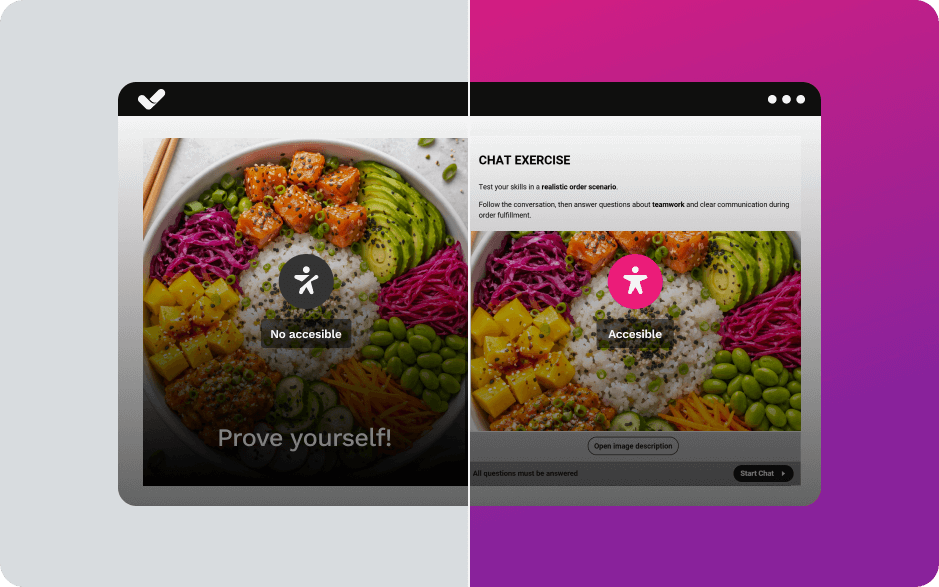
E-learning accessibility is essential to guarantee equal opportunities. This means that everyone deserves access to the same information, training, experiences, and interactions as others, regardless of their condition.
There are currently international standards that ensure accessibility when developing websites, e-learning courses, or any type of content that is accessed exclusively online.
The most widely used reference sources to measure the level of accessibility of a website are the Web Content Accessibility Guidelines (WCAG), developed by the Web Accessibility Initiative (WAI), part of the World Wide Web Consortium (W3C).
The current version is WCAG 2.2 (published in October 2023), which includes additional success criteria to improve accessibility on mobile devices and for people with cognitive disabilities.
WCAG are international standards used by organizations, governments, and individuals to create accessible web content. These guidelines apply to web content, including text, images, audio, code, and more.
The four fundamental WCAG principles (POUR) establish the foundation of any accessible digital experience and are especially relevant in the field of e-learning:
Section 508 is an amendment to the Workforce Rehabilitation Act of 1973, updated in 1998 and refreshed in 2018 to align with WCAG 2.0 Level AA. It is considered a benchmark for web accessibility requirements and standards.
Section 508 requires that all electronic and information technology developed, maintained, procured, or used by the U.S. federal government be accessible. Its standards apply to software, hardware, multimedia, and websites, and are also voluntarily adopted by many private organizations as best practices.
Key difference: While WCAG are international voluntary guidelines (unless incorporated into national legislation), Section 508 is a legally binding requirement for U.S. federal agencies. In practice, complying with WCAG 2.1 Level AA generally satisfies Section 508 requirements.
To comply with WCAG standards, content must meet testable success criteria organized into three levels of conformance:
| Level | Criteria | Key requirements for e-learning |
|---|---|---|
| A (Basic) | 30 criteria | Text alternatives for images (alt text). Captions for prerecorded audio content. Functional keyboard navigation. Adaptable content without loss of information. Color not used as the only means of conveying information. |
| AA (Intermediate) | 50 criteria (A + 20) | Recommended level for corporate e-learning courses. Captions for live audio. Minimum color contrast: 4.5:1 for normal text, 3:1 for large text. Text resizable up to 200% without loss of functionality. Content orientation not restricted (horizontal/vertical). Multiple navigation methods (menu, search, sitemap). Headings and descriptive labels. |
| AAA (Advanced) | 78 criteria (AA + 28) | Sign language interpretation for multimedia content. Extended audio descriptions. Enhanced contrast: 7:1 for text. Reading level equivalent to lower secondary education. Definitions of unusual words and technical jargon. Context-sensitive help available. No strict time limits for data entry. |
Recommendation: For most corporate e-learning courses, Level AA is the recommended standard, as it balances broad accessibility with practical implementation feasibility. Although Level AAA is ideal, it can be difficult to achieve across all content and is typically reserved for specific high-impact sections.
This checklist will help you audit and remediate the critical components of your e-learning courses. It includes WCAG 2.2 Level A/AA criteria, prioritized based on their real impact on the user experience.
Make sure that:
Verify that:
Check that:
Accessibility evaluation requires a combination of automated tools and manual testing. Here are some of the most effective tools:
| Tool | Key Functionality | Type / Pricing |
|---|---|---|
| axe DevTools | Browser extension that analyzes web pages and detects WCAG A/AA/AAA issues. Includes remediation guidance. | Browser / Free–Paid |
| WAVE | Visual tool that displays accessibility errors and alerts directly on the page using icons. | Browser / Free |
| Lighthouse | Automated Google audit integrated into Chrome DevTools. Includes accessibility score (0–100). | DevTools / Free |
| Pa11y | Command-line tool for CI/CD integration. Automates accessibility testing in development pipelines. | DevTools / Free |
| Siteimprove | Enterprise platform for continuous accessibility monitoring. Includes reporting and progress tracking. | Platform / Paid |
Automated tools detect approximately 30–40% of accessibility issues. Manual testing is essential for a comprehensive evaluation:
The new European Accessibility Act (EAA) requires that all corporate digital content comply with EN 301 549 and WCAG 2.1 accessibility standards. Are your courses ready? Download our free e-learning accessibility test and find out.

E-LEARNING ACCESSIBILITY TEST
s your e-learning content compliant with the European Accessibility Act?


Complying with WCAG 2.2 Level A/AA should not rely exclusively on post-production audits or complex manual reviews. Accessibility in e-learning must be integrated from the moment the course is created—that is, directly within the authoring tool.
When the creation platform does not structurally incorporate accessibility criteria, the training team ends up spending additional time correcting errors, reviewing code, rebuilding interactions, or implementing external fixes. This not only increases production costs but also raises the risk of non-compliance with regulatory frameworks such as EN 301 549 or the European Accessibility Act.
An authoring tool aligned with WCAG standards simplifies this process by natively incorporating:
In this context, isEazy Author integrates accessibility criteria directly into the content architecture, enabling you to create interactive courses, assessments, and multimedia learning experiences aligned with WCAG standards—without requiring advanced technical knowledge. In addition, its design system and templates make it easier to maintain structural consistency and predictable navigation, two key elements for achieving Level AA compliance.
Accessibility is not an afterthought. It is a strategic decision that must be embedded in instructional design, the technology used, and the organization’s commitment to inclusion. Choosing tools that integrate accessibility from the outset not only reduces legal risk but also improves the learning experience for all users.
If you want to create accessible courses without sacrificing interactivity, request a demo and discover how to integrate accessibility into your e-learning courses from the very first click.
Accessibility in e-learning refers to the ability of online learning materials and systems to be used by everyone, including people with visual, auditory, motor, or cognitive disabilities. It ensures that all individuals can fully participate in the learning process.
Guaranteeing accessibility is essential to provide equal opportunities. It ensures that all people, regardless of their abilities, have access to the same training and content, which is crucial both ethically and legally.
The main standards are the Web Content Accessibility Guidelines (WCAG) and Section 508 in the U.S. These define how to create accessible content for all users, focusing on perception, operability, comprehension, and robustness of the content.
The AA level of WCAG is recommended as it covers most accessibility needs. However, aiming for AAA level ensures more comprehensive accessibility for a wider audience.
To improve accessibility, add captions and audio descriptions to videos, ensure images have alt text, enable keyboard navigation, and use proper color contrast to support users with visual impairments.

Unleash your full potential and create new accessible e-learning courses
Try it freeRequest a demo


Create accessible e-learning courses automatically—no expertise needed!
Let isEazy Author do the hard work for you. Design accessible e-learning courses in minutes with no technical complications

Create accessible e-learning courses automatically—no expertise needed!
Let isEazy Author do the hard work for you. Design accessible e-learning courses in minutes with no technical complications